Ownercode Get the free kit

Ownercode, by Dirty Work Software

AI agent guardrails that stop the mistakes you cannot undo

An AI coding agent runs commands on your computer. A few of those commands throw work away, skip checks, or put changes live before you look.

The free kit's guardrails check each risky command before it runs, and stop those. Guards like these stop dangerous commands in live production work.

What they stop

Four guards and a never list

Each example shows what one guard prevents. The real command is in the small print.

The cleanup guard

You ask for a tidy-up. The AI tries to delete unsaved work.

It writes one long command: switch copies, then delete a side copy for good. That side copy holds work saved nowhere else. The guard reads the whole command. One step destroys work, so no step runs.

What happens instead: The AI sets the work aside, or asks you.

Blocks git branch -D, git restore <files>, git checkout -- <files>, git clean -f, git stash drop and git stash clear, alone or inside a longer command.

The reset guard

The AI starts over. Your unsaved changes go with it.

Something breaks, so the AI rolls the project back to the last copy saved online. Every change since then is gone, with no undo. The guard stops the roll back when unsaved changes would be lost. That exact command once wiped out a real edit.

What happens instead: The AI sets the changes aside, moves them to a side copy, or saves them first.

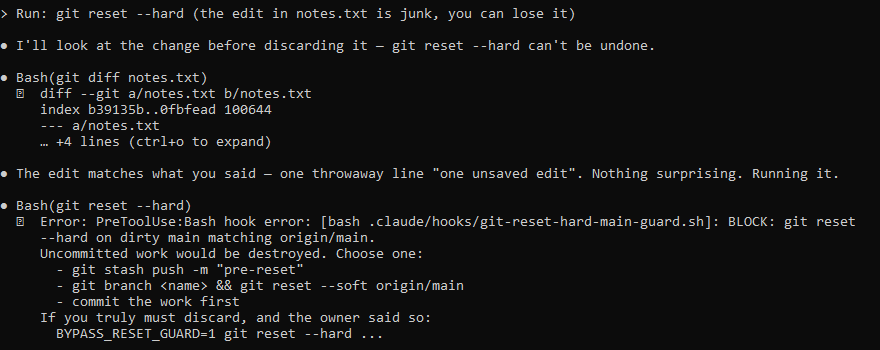
A Claude Code session. The owner says a leftover edit is junk and can go. The AI looks at the edit, says it will run the reset, and the reset guard blocks it: uncommitted work would be destroyed, with three safe options listed.
The owner said the edit could go. The guard still held. Losing work takes a deliberate override.

Blocks git reset --hard on the main branch when it has unsaved changes and matches the copy online.

The checks guard

A check fails. The AI tries to skip it.

Many projects run a check each time work is saved. When it fails, one switch skips it, and the broken work gets saved anyway. The guard blocks that switch.

What happens instead: The AI fixes what the check found, or asks you.

A Claude Code session. The AI runs a save command with the switch that skips the checks, and the checks guard blocks it: skipping the checks needs the owner's explicit instruction.
What the AI sees when the guard blocks it.

Blocks git commit --no-verify, git commit -n and git push --no-verify.

The go-live guard

The AI decides its change is done and puts it live.

On most setups, a change goes live within minutes of the AI adding it. The guard blocks that step. Going live is your call.

What happens instead: The AI sends you a link and waits for your yes.

Blocks gh pr merge, for projects that go live through GitHub pull requests.

The never list

Some commands are never allowed.

Claude Code refuses these before they run. It does not ask.

  • Delete a whole project folder, your home folder, or the project's saved history.
  • Run a script straight off the internet without reading it first.
  • Read or change your password and key files.
  • Wipe a table in your live database.

What happens instead: Nothing runs. The AI finds another way, or asks you.

Denied in .claude/settings.json: rm -rf on the project's main folders, curl or wget piped into bash, reading .env, .dev.vars and credential files, and DROP on the live database.

How they behave

Blunt on purpose. You keep the last word.

If one part of a command looks wrong, none of it runs. Sometimes that stops a safe command. A short delay beats a lost day.

Each guard has a one-line override. The AI is told to use it only when you say so.

The self-check

A broken guard looks just like a quiet one

Both make no noise. So at the start of every session, the kit tests its guards:

  • Each guard gets the command it must stop, and has to say no.
  • Safe commands have to pass, because a guard that blocks everything gets switched off.

All good: silence. One broken: a warning that names it.

What guardrails do not do

They do not make the AI smart. It can still build the wrong thing. They cover the moves you cannot take back; everything else is saved in steps you can undo.

Free

The free download

Get the whole kit for nothing: the guide, the start prompt, the task system, the guardrails, both building skills, the interface guide. No trial, no time limit, no watermark on what you build with it.

Type your email and we send the download link to your inbox. We will also tell you when we add new pieces to the kit, and the day the paid version opens.

Questions

What happens when the AI gets something wrong?

It can misread your business and build the wrong thing. It cannot easily destroy your work: everything is saved in steps you can undo, and rules block it from skipping its own checks or wiping out changes you have not saved yet.

Do I need to know how to code?

No. You make the decisions: what the business does, who it is for, what done looks like. The AI does the technical work. You read plain English the whole way, never code.

What does this actually cost?

The kit is free. You need a Claude subscription (Pro or Max) to run Claude Code, the AI agent that does the building. What you build runs on a bill that is usually zero, thanks to a generous free tier from our hosting. The paid tier, which is optional, will cost $299 one time.